<!DOCTYPE html>
    <html lang="vi" xmlns="http://www.w3.org/1999/xhtml" prefix="og: http://ogp.me/ns#">
    <head>
<title>CNTT&amp;NCKH - 9 cách đơn giản giúp tăng tốc máy tính đời cũ</title>
<meta name="description" content="CNTT&amp;NCKH - 9 cách đơn giản giúp tăng tốc máy tính đời cũ - Savefile - Tin Tức -...">
<meta name="author" content="Sở Giáo dục và Đào tạo Điện Biên">
<meta name="copyright" content="Sở Giáo dục và Đào tạo Điện Biên [webmaster@example.com]">
<meta name="generator" content="NukeViet v4.5">
<meta http-equiv="Content-Type" content="text/html; charset=utf-8">
<meta property="og:title" content="CNTT&amp;NCKH - 9 cách đơn giản giúp tăng tốc máy tính đời cũ">
<meta property="og:type" content="website">
<meta property="og:description" content="Savefile - Tin Tức - http&#x3A;&#x002F;&#x002F;dienbien.edu.vn&#x002F;index.php&#x002F;savefile&#x002F;tin-tuc-tong-hop&#x002F;CNTT-NCKH-9-cach-don-gian-giup-tang-toc-may-tinh-doi-cu-2232.html">
<meta property="og:site_name" content="Sở Giáo dục và Đào tạo Điện Biên">
<meta property="og:url" content="http://dienbien.edu.vn/index.php/savefile/tin-tuc-tong-hop/CNTT-NCKH-9-cach-don-gian-giup-tang-toc-may-tinh-doi-cu-2232.html">
<link rel="shortcut icon" href="http://dienbien.edu.vn/favicon.ico">
<link rel="canonical" href="http://dienbien.edu.vn/index.php/savefile/tin-tuc-tong-hop/CNTT-NCKH-9-cach-don-gian-giup-tang-toc-may-tinh-doi-cu-2232.html">
<link rel="alternate" href="http://dienbien.edu.vn/index.php/rss/" title="Tin Tức" type="application/rss+xml">
<link rel="alternate" href="http://dienbien.edu.vn/index.php/rss/tin-tuc-tong-hop/" title="Tin Tức - Tin tức tổng hợp" type="application/rss+xml">
<link rel="alternate" href="http://dienbien.edu.vn/index.php/rss/Giao-duc-trung-hoc/" title="Tin Tức - Giáo dục Trung học" type="application/rss+xml">
<link rel="alternate" href="http://dienbien.edu.vn/index.php/rss/giao-duc-mam-non/" title="Tin Tức - Giáo dục Mầm non - Tiểu học" type="application/rss+xml">
<link rel="alternate" href="http://dienbien.edu.vn/index.php/rss/gdtx-cn/" title="Tin Tức - Quản lý đào tạo" type="application/rss+xml">
<link rel="alternate" href="http://dienbien.edu.vn/index.php/rss/To-chuc-can-bo/" title="Tin Tức - Tổ chức cán bộ" type="application/rss+xml">
<link rel="alternate" href="http://dienbien.edu.vn/index.php/rss/Van-phong-So/" title="Tin Tức - Văn phòng Sở" type="application/rss+xml">
<link rel="alternate" href="http://dienbien.edu.vn/index.php/rss/kt-qlclgd/" title="Tin Tức - Quản lý chất lượng" type="application/rss+xml">
<link rel="alternate" href="http://dienbien.edu.vn/index.php/rss/Ke-hoach-tai-chinh/" title="Tin Tức - Kế hoạch tài chính" type="application/rss+xml">
<link rel="alternate" href="http://dienbien.edu.vn/index.php/rss/Thong-tin-tuyen-sinh/" title="Tin Tức - Thông tin tuyển sinh" type="application/rss+xml">
<link rel="alternate" href="http://dienbien.edu.vn/index.php/rss/tang-cuong-tieng-viet-cho-tre/" title="Tin Tức - Tăng cường tiếng Việt cho trẻ" type="application/rss+xml">
<link rel="alternate" href="http://dienbien.edu.vn/index.php/rss/Hoi-khuyen-hoc-tinh/" title="Tin Tức - Hội khuyến học tỉnh" type="application/rss+xml">
<link rel="alternate" href="http://dienbien.edu.vn/index.php/rss/Guong-dien-hinh-tien-tien/" title="Tin Tức - Gương điển hình tiên tiến" type="application/rss+xml">
<link rel="alternate" href="http://dienbien.edu.vn/index.php/rss/chuyen-doi-so/" title="Tin Tức - Chuyển đổi số" type="application/rss+xml">
<link rel="alternate" href="http://dienbien.edu.vn/index.php/rss/pho-cap-gdmn-cho-tre-3-5-tuoi/" title="Tin Tức - Phổ cập GDMN cho trẻ 3-5 tuổi" type="application/rss+xml">
<link rel="alternate" href="http://dienbien.edu.vn/index.php/rss/chuong-trinh-xay-dung-phong-o-ban-tru-noi-tru-cho-hoc-sinh/" title="Tin Tức - Chương trình xây dựng phòng ở bán trú, nội trú cho học sinh" type="application/rss+xml">
<link rel="alternate" href="http://dienbien.edu.vn/index.php/rss/Truong-dep-Truong-kho-khan/" title="Tin Tức - Trường đẹp-Trường khó khăn" type="application/rss+xml">
<link rel="alternate" href="http://dienbien.edu.vn/index.php/rss/ba-cong-khai/" title="Tin Tức - Ba công khai" type="application/rss+xml">
<link rel="alternate" href="http://dienbien.edu.vn/index.php/rss/sang-kien/" title="Tin Tức - Sáng kiến" type="application/rss+xml">
<link rel="alternate" href="http://dienbien.edu.vn/index.php/rss/quan-ly-giao-duc/" title="Tin Tức - Quản lý giáo dục" type="application/rss+xml">
<link rel="alternate" href="http://dienbien.edu.vn/index.php/rss/cong-tac-chu-nhiem/" title="Tin Tức - Công tác chủ nhiệm" type="application/rss+xml">
<link rel="alternate" href="http://dienbien.edu.vn/index.php/rss/cong-tac-doan/" title="Tin Tức - Công tác Đoàn" type="application/rss+xml">
<link rel="alternate" href="http://dienbien.edu.vn/index.php/rss/toan-hoc-75/" title="Tin Tức - Toán học" type="application/rss+xml">
<link rel="alternate" href="http://dienbien.edu.vn/index.php/rss/vat-ly-76/" title="Tin Tức - Vật lý" type="application/rss+xml">
<link rel="alternate" href="http://dienbien.edu.vn/index.php/rss/hoa-hoc-77/" title="Tin Tức - Hóa học" type="application/rss+xml">
<link rel="alternate" href="http://dienbien.edu.vn/index.php/rss/sinh-hoc/" title="Tin Tức - Sinh học" type="application/rss+xml">
<link rel="alternate" href="http://dienbien.edu.vn/index.php/rss/ngoai-ngu/" title="Tin Tức - Ngoại ngữ" type="application/rss+xml">
<link rel="alternate" href="http://dienbien.edu.vn/index.php/rss/van-hoc-80/" title="Tin Tức - Văn học" type="application/rss+xml">
<link rel="alternate" href="http://dienbien.edu.vn/index.php/rss/dia-ly-81/" title="Tin Tức - Địa lý" type="application/rss+xml">
<link rel="alternate" href="http://dienbien.edu.vn/index.php/rss/lich-su-82/" title="Tin Tức - Lịch sử" type="application/rss+xml">
<link rel="alternate" href="http://dienbien.edu.vn/index.php/rss/cong-nghe-thong-tin/" title="Tin Tức - Công nghệ thông tin" type="application/rss+xml">
<link rel="alternate" href="http://dienbien.edu.vn/index.php/rss/giao-duc-cong-dan-84/" title="Tin Tức - Giáo dục công dân" type="application/rss+xml">
<link rel="alternate" href="http://dienbien.edu.vn/index.php/rss/giao-duc-quoc-phong/" title="Tin Tức - Giáo dục quốc phòng" type="application/rss+xml">
<link rel="alternate" href="http://dienbien.edu.vn/index.php/rss/cac-linh-vuc-khac/" title="Tin Tức - Các lĩnh vực khác" type="application/rss+xml">
<link rel="alternate" href="http://dienbien.edu.vn/index.php/rss/do-dung-day-hoc/" title="Tin Tức - Đồ dùng dạy học" type="application/rss+xml">
<link rel="alternate" href="http://dienbien.edu.vn/index.php/rss/toan-hoc/" title="Tin Tức - Toán học" type="application/rss+xml">
<link rel="alternate" href="http://dienbien.edu.vn/index.php/rss/vat-ly/" title="Tin Tức - Vật lý" type="application/rss+xml">
<link rel="alternate" href="http://dienbien.edu.vn/index.php/rss/hoa-hoc/" title="Tin Tức - Hóa học" type="application/rss+xml">
<link rel="alternate" href="http://dienbien.edu.vn/index.php/rss/van-hoc-61/" title="Tin Tức - Văn học" type="application/rss+xml">
<link rel="alternate" href="http://dienbien.edu.vn/index.php/rss/lich-su-62/" title="Tin Tức - Lịch sử" type="application/rss+xml">
<link rel="alternate" href="http://dienbien.edu.vn/index.php/rss/dia-ly/" title="Tin Tức - Địa lý" type="application/rss+xml">
<link rel="alternate" href="http://dienbien.edu.vn/index.php/rss/tin-hoc/" title="Tin Tức - Tin học" type="application/rss+xml">
<link rel="alternate" href="http://dienbien.edu.vn/index.php/rss/tieng-anh/" title="Tin Tức - Tiếng anh" type="application/rss+xml">
<link rel="alternate" href="http://dienbien.edu.vn/index.php/rss/giao-duc-cong-dan/" title="Tin Tức - Giáo dục công dân" type="application/rss+xml">
<link rel="alternate" href="http://dienbien.edu.vn/index.php/rss/cong-nghe/" title="Tin Tức - Công nghệ" type="application/rss+xml">
<link rel="alternate" href="http://dienbien.edu.vn/index.php/rss/tieu-hoc/" title="Tin Tức - Tiểu học" type="application/rss+xml">
<link rel="alternate" href="http://dienbien.edu.vn/index.php/rss/mam-non/" title="Tin Tức - Mầm non" type="application/rss+xml">
<link rel="alternate" href="http://dienbien.edu.vn/index.php/rss/day-hoc-tren-truyen-hinh/" title="Tin Tức - Dạy học trên truyền hình" type="application/rss+xml">
<link rel="alternate" href="http://dienbien.edu.vn/index.php/rss/mon-toan/" title="Tin Tức - Môn Toán" type="application/rss+xml">
<link rel="alternate" href="http://dienbien.edu.vn/index.php/rss/mon-vat-ly/" title="Tin Tức - Môn Vật lý" type="application/rss+xml">
<link rel="alternate" href="http://dienbien.edu.vn/index.php/rss/mon-hoa-hoc/" title="Tin Tức - Môn Hoá học" type="application/rss+xml">
<link rel="alternate" href="http://dienbien.edu.vn/index.php/rss/mon-sinh-hoc/" title="Tin Tức - Môn Sinh học" type="application/rss+xml">
<link rel="alternate" href="http://dienbien.edu.vn/index.php/rss/mon-ngu-van/" title="Tin Tức - Môn Ngữ văn" type="application/rss+xml">
<link rel="alternate" href="http://dienbien.edu.vn/index.php/rss/mon-lich-su/" title="Tin Tức - Môn Lịch sử" type="application/rss+xml">
<link rel="alternate" href="http://dienbien.edu.vn/index.php/rss/mon-dia-ly/" title="Tin Tức - Môn Địa lý" type="application/rss+xml">
<link rel="alternate" href="http://dienbien.edu.vn/index.php/rss/mon-gdcd/" title="Tin Tức - Môn GDCD" type="application/rss+xml">
<link rel="alternate" href="http://dienbien.edu.vn/index.php/rss/mon-tieng-anh/" title="Tin Tức - Môn Tiếng Anh" type="application/rss+xml">
<link rel="alternate" href="http://dienbien.edu.vn/index.php/rss/Cac-Chi-hoi/" title="Tin Tức - Các Chi hội" type="application/rss+xml">
<link rel="alternate" href="http://dienbien.edu.vn/index.php/rss/Lich-su/" title="Tin Tức - Lịch sử" type="application/rss+xml">
<link rel="alternate" href="http://dienbien.edu.vn/index.php/rss/My-thuat/" title="Tin Tức - Mỹ thuật" type="application/rss+xml">
<link rel="alternate" href="http://dienbien.edu.vn/index.php/rss/Van-hoc/" title="Tin Tức - Văn học" type="application/rss+xml">
<link rel="alternate" href="http://dienbien.edu.vn/index.php/rss/sang-tac-moi/" title="Tin Tức - Sáng tác mới" type="application/rss+xml">
<link rel="preload" as="style" href="http://dienbien.edu.vn/assets/css/font-awesome.min.css" type="text/css">
<link rel="preload" as="style" href="http://dienbien.edu.vn/themes/edu-sgd/css/bootstrap.non-responsive.css" type="text/css">
<link rel="preload" as="style" href="http://dienbien.edu.vn/themes/edu-sgd/css/style.css" type="text/css">
<link rel="preload" as="style" href="http://dienbien.edu.vn/themes/edu-sgd/css/style.non-responsive.css" type="text/css">
<link rel="preload" as="style" href="http://dienbien.edu.vn/themes/edu-sgd/css/news.css" type="text/css">
<link rel="preload" as="style" href="http://dienbien.edu.vn/themes/edu-sgd/css/custom.css" type="text/css">
<link rel="preload" as="script" href="http://dienbien.edu.vn/assets/js/jquery/jquery.min.js" type="text/javascript">
<link rel="preload" as="script" href="http://dienbien.edu.vn/assets/js/language/vi.js" type="text/javascript">
<link rel="preload" as="script" href="http://dienbien.edu.vn/assets/js/DOMPurify/purify3.js" type="text/javascript">
<link rel="preload" as="script" href="http://dienbien.edu.vn/assets/js/global.js" type="text/javascript">
<link rel="preload" as="script" href="http://dienbien.edu.vn/assets/js/site.js" type="text/javascript">
<link rel="preload" as="script" href="http://dienbien.edu.vn/themes/edu-sgd/js/news.js" type="text/javascript">
<link rel="preload" as="script" href="http://dienbien.edu.vn/themes/edu-sgd/js/main.js" type="text/javascript">
<link rel="preload" as="script" href="http://dienbien.edu.vn/themes/edu-sgd/js/custom.js" type="text/javascript">
<link rel="preload" as="script" href="http://dienbien.edu.vn/themes/edu-sgd/js/bootstrap.min.js" type="text/javascript">
<link rel="stylesheet" href="http://dienbien.edu.vn/assets/css/font-awesome.min.css">
<link rel="stylesheet" href="http://dienbien.edu.vn/themes/edu-sgd/css/bootstrap.non-responsive.css">
<link rel="stylesheet" href="http://dienbien.edu.vn/themes/edu-sgd/css/style.css">
<link rel="stylesheet" href="http://dienbien.edu.vn/themes/edu-sgd/css/style.non-responsive.css">
<link rel="StyleSheet" href="http://dienbien.edu.vn/themes/edu-sgd/css/news.css">
<link rel="stylesheet" href="http://dienbien.edu.vn/themes/edu-sgd/css/custom.css">
<style type="text/css">
	body{background: #fff;}
</style>
    </head>
    <body>
<div id="print">
	<div id="hd_print">
		<h2 class="pull-left">Sở Giáo dục và Đào tạo Điện Biên</h2>
		<p class="pull-right"><a title="Sở Giáo dục và Đào tạo Điện Biên" href="http://dienbien.edu.vn/">http://dienbien.edu.vn</a></p>
	</div>
	<div class="clear"></div>
	<hr />
	<div id="content">
		<h1>CNTT&amp;NCKH - 9 cách đơn giản giúp tăng tốc máy tính đời cũ</h1>
		<ul class="list-inline">
			<li>Thứ năm - 01/12/2016 13:59</li>
			<li class="hidden-print txtrequired"><em class="fa fa-print">&nbsp;</em><a title="In ra" href="javascript:;" onclick="window.print()">In ra</a></li>
			<li class="hidden-print txtrequired"><em class="fa fa-power-off">&nbsp;</em><a title="Đóng cửa sổ này" href="javascript:;" onclick="window.close()">Đóng cửa sổ này</a></li>
		</ul>
		<div class="clear"></div>
		<div id="hometext">
			Trình điều khiển (driver) gặp trục trặc, phần cứng lỗi thời, bụi bẩn hay ổ cứng bị đầy là những nguyên nhân hàng đầu khiến hiệu suất máy tính giảm đi đáng kể.
		</div>
		<div id="bodytext" class="clearfix">
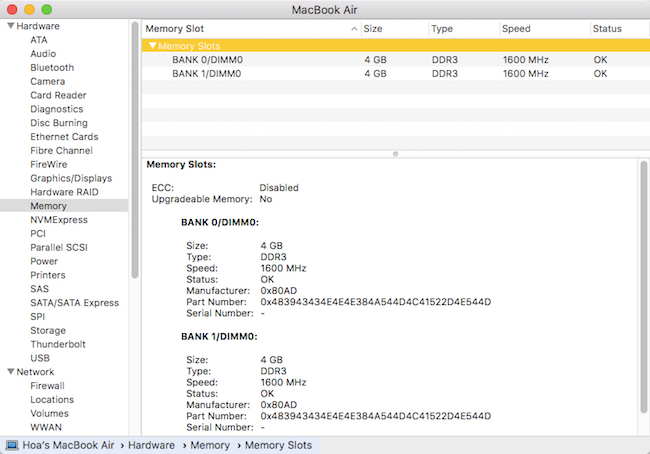
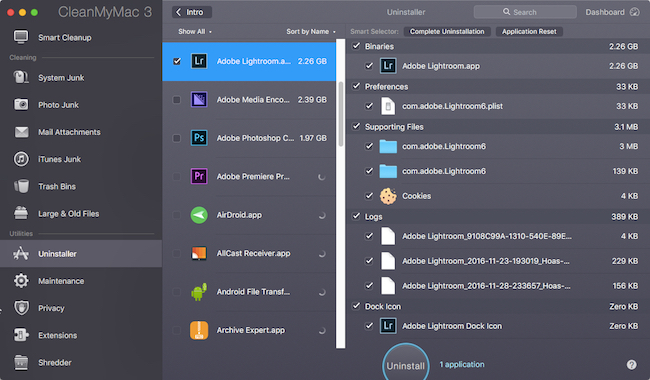
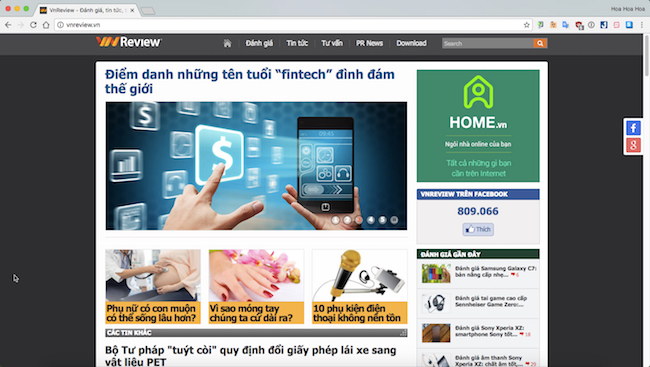
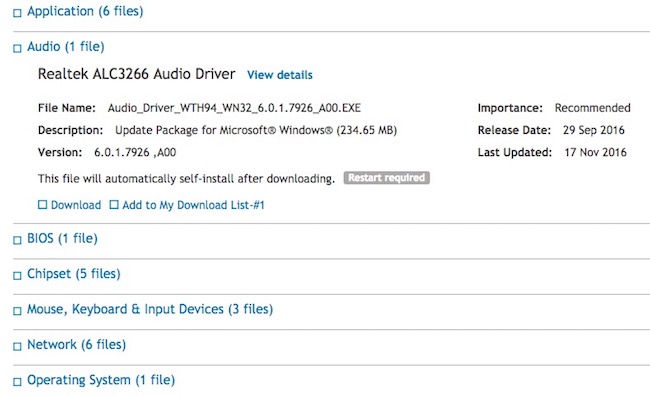
			<p style="margin: 0px 0px 1em; font-family: tahoma; color: rgb(0, 0, 0); padding: 3px 0px !important; font-size: 14px !important; text-align: justify; background-color: rgb(253, 253, 253);"> Tuy nhiên, trước khi nghĩ đến việc mua thiết bị mới, bạn có thể áp dụng một số mẹo nhỏ sau đây để khắc phục dựa theo gợi ý của&nbsp;<em>VnReview.vn</em>&nbsp;tham khảo từ chuyên trang&nbsp;<em>LaptopMag</em>:</p><p id="aui_3_2_0_1361" style="margin: 0px 0px 1em; font-family: tahoma; color: rgb(0, 0, 0); padding: 3px 0px !important; font-size: 14px !important; text-align: justify; background-color: rgb(253, 253, 253);"> <strong id="aui_3_2_0_1359" style="font-stretch: normal; padding: 3px 0px !important;">1. Nâng cấp ổ SSD</strong></p><p id="aui_3_2_0_1372" style="margin: 0px 0px 1em; font-family: tahoma; color: rgb(0, 0, 0); padding: 3px 0px !important; font-size: 14px !important; text-align: justify; background-color: rgb(253, 253, 253);"> Đây là giải pháp đầu tiên mà bạn nên nghĩ đến khi muốn cải thiện hiệu suất máy tính, đặc biệt là những thiết bị đã có tuổi đời hơn 3 năm. So với ổ cứng HDD truyền thống, ổ SSD cho tốc độ mở ứng dụng, xử lý công việc hay tắt/bật máy tính nhanh hơn trước gấp nhiều lần.</p><p id="aui_3_2_0_1377" style="margin: 0px 0px 1em; font-family: tahoma; color: rgb(0, 0, 0); padding: 3px 0px !important; font-size: 14px !important; text-align: justify; background-color: rgb(253, 253, 253);"> Theo ghi nhận, ổ SSD 256 GB trên thị trường hiện tại sẽ có mức giá rơi vào khoảng tầm từ 1,5 - 2,5 triệu đồng với rất nhiều thương hiệu để bạn lựa chọn, đơn cử như SanDisk, Zotac, Intel, PNY, Crucial… Lưu ý, nếu muốn sử dụng cả hai ổ SSD và HDD cùng lúc, bạn hãy ưu tiên cài đặt hệ điều hành lên ổ SSD để có được tốc độ tốt nhất.</p><p style="margin: 0px 0px 1em; font-family: tahoma; color: rgb(0, 0, 0); padding: 3px 0px !important; font-size: 14px !important; text-align: justify; background-color: rgb(253, 253, 253);"> <img alt="" src="http://vnreview.vn/image/16/00/16/1600166.jpg?t=1480519457882" style="border: 0px; width: 500px; height: 252px;" /></p><p style="margin: 0px 0px 1em; font-family: tahoma; color: rgb(0, 0, 0); padding: 3px 0px !important; font-size: 14px !important; text-align: justify; background-color: rgb(253, 253, 253);"> <strong style="font-stretch: normal; padding: 3px 0px !important;">2. Nâng cấp RAM</strong></p><p id="aui_3_2_0_1380" style="margin: 0px 0px 1em; font-family: tahoma; color: rgb(0, 0, 0); padding: 3px 0px !important; font-size: 14px !important; text-align: justify; background-color: rgb(253, 253, 253);"> Việc nâng cấp RAM thường khá đơn giản, tuy nhiên, trước khi thực hiện, người dùng cần phải xác định Bus RAM và mua đúng loại để tránh xảy ra xung đột. Đầu tiên, bạn hãy cài đặt phần mềm CPU-Z (https://goo.gl/JqbG) cho máy tính, sau đó, chuyển sang thẻ Memory và chú ý đến các phần sau:</p><p id="aui_3_2_0_1383" style="margin: 0px 0px 1em; font-family: tahoma; color: rgb(0, 0, 0); padding: 3px 0px !important; font-size: 14px !important; text-align: justify; background-color: rgb(253, 253, 253);"> - Type: Loại RAM đang gắn trên máy tính (DDR, DDR2, DDR3…)</p><p id="aui_3_2_0_1386" style="margin: 0px 0px 1em; font-family: tahoma; color: rgb(0, 0, 0); padding: 3px 0px !important; font-size: 14px !important; text-align: justify; background-color: rgb(253, 253, 253);"> - DRAM Frequency: Nhân con số này với 2 sẽ ra Bus RAM thực tế.</p><p style="margin: 0px 0px 1em; font-family: tahoma; color: rgb(0, 0, 0); padding: 3px 0px !important; font-size: 14px !important; text-align: justify; background-color: rgb(253, 253, 253);"> <img alt="" src="http://vnreview.vn/image/16/00/14/1600148.jpg?t=1480519457882" style="border: 0px; width: 500px; height: 405px;" /></p><p id="aui_3_2_0_1389" style="margin: 0px 0px 1em; font-family: tahoma; color: rgb(0, 0, 0); padding: 3px 0px !important; font-size: 14px !important; text-align: justify; background-color: rgb(253, 253, 253);"> Để kiểm tra số lượng khe cắm RAM trên máy tính, bạn hãy chuyển sang thẻ&nbsp;<em>SPD &gt; Slot</em>. Việc này sẽ tránh được tình trạng mua RAM về nhưng không có chỗ gắn. Khi có đầy đủ thông số, bạn chỉ cần mua thanh RAM tương ứng và tiến hành nâng cấp.</p><p id="aui_3_2_0_1392" style="margin: 0px 0px 1em; font-family: tahoma; color: rgb(0, 0, 0); padding: 3px 0px !important; font-size: 14px !important; text-align: justify; background-color: rgb(253, 253, 253);"> Nếu đang sử dụng MacBook, bạn bấm vào biểu tượng Apple ở góc trên bên trái, chọn&nbsp;<em>About this Mac &gt; System Report &gt; Memory &gt; Slot</em>. Nhiều người thường nghĩ rằng RAM càng cao thì máy tính sẽ chạy càng nhanh, tuy nhiên, việc này hoàn toàn sai lầm bởi nó sẽ gây ra tình trạng nghẽn cổ chai.</p><p style="margin: 0px 0px 1em; font-family: tahoma; color: rgb(0, 0, 0); padding: 3px 0px !important; font-size: 14px !important; text-align: justify; background-color: rgb(253, 253, 253);"> <img alt="" src="http://vnreview.vn/image/16/00/16/1600163.jpg?t=1480519457882" style="border: 0px; width: 500px; height: 349px;" /></p><p style="margin: 0px 0px 1em; font-family: tahoma; color: rgb(0, 0, 0); padding: 3px 0px !important; font-size: 14px !important; text-align: justify; background-color: rgb(253, 253, 253);"> Lưu ý: Một số dòng thiết bị thường được nhà sản xuất hàn chết thanh RAM trên bo mạch chủ (mainboard), ví dụ như MacBook Air, khiến cho việc thay thế hoặc nâng cấp trở nên khó khăn hơn. Do đó, khi mua những sản phẩm này, bạn hãy chọn phiên bản có cấu hình cao để đỡ phải nâng cấp về sau.</p><p style="margin: 0px 0px 1em; font-family: tahoma; color: rgb(0, 0, 0); padding: 3px 0px !important; font-size: 14px !important; text-align: justify; background-color: rgb(253, 253, 253);"> <strong style="font-stretch: normal; padding: 3px 0px !important;">3. Tắt bớt các ứng dụng khởi động cùng hệ thống</strong></p><p id="aui_3_2_0_1396" style="margin: 0px 0px 1em; font-family: tahoma; color: rgb(0, 0, 0); padding: 3px 0px !important; font-size: 14px !important; text-align: justify; background-color: rgb(253, 253, 253);"> Nếu muốn tăng hiệu suất máy tính và giảm thời gian khởi động, bạn hãy nhấn phải chuột lên thanh tác vụ và chọn<em>&nbsp;Task Manager</em>. Sau đó, chuyển sang thẻ&nbsp;<em id="aui_3_2_0_1395">Startup</em>, chọn các ứng dụng không cần thiết và&nbsp;<em>Disable</em>.</p><p style="margin: 0px 0px 1em; font-family: tahoma; color: rgb(0, 0, 0); padding: 3px 0px !important; font-size: 14px !important; text-align: justify; background-color: rgb(253, 253, 253);"> <img alt="" src="http://vnreview.vn/image/16/00/17/1600175.jpg?t=1480519457883" style="border: 0px; width: 500px; height: 325px;" /></p><p style="margin: 0px 0px 1em; font-family: tahoma; color: rgb(0, 0, 0); padding: 3px 0px !important; font-size: 14px !important; text-align: justify; background-color: rgb(253, 253, 253);"> Đối với MacBook, người dùng chỉ cần mở<em>&nbsp;System Preferences &gt; User &amp; Group &gt; Login Items</em>, chọn các ứng dụng không cần thiết và nhấn vào biểu tượng dấu &quot;-&quot; để loại bỏ.</p><p style="margin: 0px 0px 1em; font-family: tahoma; color: rgb(0, 0, 0); padding: 3px 0px !important; font-size: 14px !important; text-align: justify; background-color: rgb(253, 253, 253);"> <img alt="" src="http://vnreview.vn/image/16/00/16/1600169.jpg?t=1480519457882" style="border: 0px; width: 500px; height: 362px;" /></p><p style="margin: 0px 0px 1em; font-family: tahoma; color: rgb(0, 0, 0); padding: 3px 0px !important; font-size: 14px !important; text-align: justify; background-color: rgb(253, 253, 253);"> <strong style="font-stretch: normal; padding: 3px 0px !important;">4. Gỡ bớt các phần mềm chưa sử dụng</strong></p><p style="margin: 0px 0px 1em; font-family: tahoma; color: rgb(0, 0, 0); padding: 3px 0px !important; font-size: 14px !important; text-align: justify; background-color: rgb(253, 253, 253);"> Nếu cài đặt quá nhiều phần mềm, máy tính sẽ rất dễ bị đầy ổ cứng và không có chỗ để lưu trữ các tập tin tạm. Do đó, để thiết bị có thể chạy nhanh hơn, bạn nên gỡ bớt các phần mềm chưa sử dụng bằng<em>&nbsp;Control Panel&nbsp;</em>hoặc các ứng dụng của bên thứ ba như IObit Uninstaller, CleanMyMac, CCleaner…</p><p style="margin: 0px 0px 1em; font-family: tahoma; color: rgb(0, 0, 0); padding: 3px 0px !important; font-size: 14px !important; text-align: justify; background-color: rgb(253, 253, 253);"> <img alt="" src="http://vnreview.vn/image/16/00/14/1600145.jpg?t=1480519457882" style="border: 0px; width: 500px; height: 292px;" /></p><p style="margin: 0px 0px 1em; font-family: tahoma; color: rgb(0, 0, 0); padding: 3px 0px !important; font-size: 14px !important; text-align: justify; background-color: rgb(253, 253, 253);"> <strong style="font-stretch: normal; padding: 3px 0px !important;">5. Quét Malware thường xuyên</strong></p><p style="margin: 0px 0px 1em; font-family: tahoma; color: rgb(0, 0, 0); padding: 3px 0px !important; font-size: 14px !important; text-align: justify; background-color: rgb(253, 253, 253);"> Khi malware xâm nhập vào máy tính, chúng sẽ tự động cài đặt thêm các tiện ích độc hại hoặc đánh cắp thông tin cá nhân, đồng thời khiến thiết bị hoạt động chậm chạp hơn. Do đó, để loại bỏ các mối đe dọa này trong tương lai, người dùng nên tạo thói quen thường xuyên quét malware mỗi ngày bằng các ứng dụng như Bkav Pro, Malwarebytes Anti-Malware, AdwCleaner, HitmanPro…</p><p style="margin: 0px 0px 1em; font-family: tahoma; color: rgb(0, 0, 0); padding: 3px 0px !important; font-size: 14px !important; text-align: justify; background-color: rgb(253, 253, 253);"> <img alt="" src="http://vnreview.vn/image/16/00/16/1600160.jpg?t=1480519457882" style="border: 0px; width: 500px; height: 362px;" /></p><p style="margin: 0px 0px 1em; font-family: tahoma; color: rgb(0, 0, 0); padding: 3px 0px !important; font-size: 14px !important; text-align: justify; background-color: rgb(253, 253, 253);"> <strong style="font-stretch: normal; padding: 3px 0px !important;">6. Vô hiệu hóa các hiệu ứng không cần thiết</strong></p><p style="margin: 0px 0px 1em; font-family: tahoma; color: rgb(0, 0, 0); padding: 3px 0px !important; font-size: 14px !important; text-align: justify; background-color: rgb(253, 253, 253);"> Nếu đang sử dụng Windows, bạn nhấn tổ hợp phím Win + S và gõ vào khung tìm kiếm từ khóa&nbsp;<em>View advanced system settings, Performance &gt; Settings</em>. Sau đó, bạn đánh dấu vào tùy chọn&nbsp;<em>Adjust for best performance</em>&nbsp;để tắt bớt các hiệu ứng đặc biệt và ảnh động.</p><p style="margin: 0px 0px 1em; font-family: tahoma; color: rgb(0, 0, 0); padding: 3px 0px !important; font-size: 14px !important; text-align: justify; background-color: rgb(253, 253, 253);"> <img alt="" src="http://vnreview.vn/image/16/00/15/1600157.jpg?t=1480519457882" style="border: 0px; width: 500px; height: 385px;" /></p><p style="margin: 0px 0px 1em; font-family: tahoma; color: rgb(0, 0, 0); padding: 3px 0px !important; font-size: 14px !important; text-align: justify; background-color: rgb(253, 253, 253);"> Đối với MacBook, bạn vào<em>&nbsp;System Preferences &gt; Dock&nbsp;</em>và tắt bớt các hiệu ứng phóng đại, ảnh động trong quá trình sử dụng.</p><p style="margin: 0px 0px 1em; font-family: tahoma; color: rgb(0, 0, 0); padding: 3px 0px !important; font-size: 14px !important; text-align: justify; background-color: rgb(253, 253, 253);"> <img alt="" src="http://vnreview.vn/image/16/00/15/1600151.jpg?t=1480519457882" style="border: 0px; width: 500px; height: 283px;" /></p><p style="margin: 0px 0px 1em; font-family: tahoma; color: rgb(0, 0, 0); padding: 3px 0px !important; font-size: 14px !important; text-align: justify; background-color: rgb(253, 253, 253);"> <strong style="font-stretch: normal; padding: 3px 0px !important;">7. Vệ sinh máy tính định kỳ</strong></p><p id="aui_3_2_0_1401" style="margin: 0px 0px 1em; font-family: tahoma; color: rgb(0, 0, 0); padding: 3px 0px !important; font-size: 14px !important; text-align: justify; background-color: rgb(253, 253, 253);"> Sau một thời gian dài sử dụng, bạn hãy mang thiết bị đến cửa hàng để nhờ kĩ thuật viên vệ sinh và làm sạch bụi bẩn. Bởi nếu máy tính quá nóng sẽ dẫn đến việc Windows Explorer mất nhiều thời gian hơn để hiển thị files và mở dữ liệu. Ngoài ra, người dùng cũng có thể sử dụng bình khí nén để làm sạch các lỗ tản nhiệt, hoặc cho máy tính nghỉ ngơi nếu đã bật quá lâu.</p><p style="margin: 0px 0px 1em; font-family: tahoma; color: rgb(0, 0, 0); padding: 3px 0px !important; font-size: 14px !important; text-align: justify; background-color: rgb(253, 253, 253);"> <strong style="font-stretch: normal; padding: 3px 0px !important;">8. Thay đổi trình duyệt</strong></p><p id="aui_3_2_0_1404" style="margin: 0px 0px 1em; font-family: tahoma; color: rgb(0, 0, 0); padding: 3px 0px !important; font-size: 14px !important; text-align: justify; background-color: rgb(253, 253, 253);"> Nếu đang sử dụng Internet Explorer hay những trình duyệt đã lỗi thời, bạn nên đổi sang Chrome, Firefox hoặc Microsoft Edge để có được tốc độ tốt nhất. Trên MacBook, bạn có thể thử Safari.</p><p style="margin: 0px 0px 1em; font-family: tahoma; color: rgb(0, 0, 0); padding: 3px 0px !important; font-size: 14px !important; text-align: justify; background-color: rgb(253, 253, 253);"> <img alt="" src="http://vnreview.vn/image/16/00/17/1600178.jpg?t=1480519457883" style="border: 0px; width: 500px; height: 282px;" /></p><p style="margin: 0px 0px 1em; font-family: tahoma; color: rgb(0, 0, 0); padding: 3px 0px !important; font-size: 14px !important; text-align: justify; background-color: rgb(253, 253, 253);"> <strong style="font-stretch: normal; padding: 3px 0px !important;">9. Cập nhật trình điều khiển (driver)</strong></p><p id="aui_3_2_0_1407" style="margin: 0px 0px 1em; font-family: tahoma; color: rgb(0, 0, 0); padding: 3px 0px !important; font-size: 14px !important; text-align: justify; background-color: rgb(253, 253, 253);"> Việc cập nhật trình điều khiển (driver) sẽ giúp khắc phục gần như các lỗi còn tồn đọng trước đó. Tuy nhiên, người dùng chỉ nên lên trang chủ của nhà sản xuất thiết bị để tải về trình điều khiển tương ứng.</p><p id="aui_3_2_0_1410" style="margin: 0px 0px 1em; font-family: tahoma; color: rgb(0, 0, 0); padding: 3px 0px !important; font-size: 14px !important; text-align: justify; background-color: rgb(253, 253, 253);"> Bên cạnh đó, bạn cũng nên hạn chế sử dụng các phần mềm cài đặt driver tự động như DriverPack Solution (xuất xứ từ Nga, dung lượng 13 GB) và đặc biệt là Easy Driver (xuất xứ Trung Quốc)… Dù có mức dung lượng chỉ khoảng 500 MB nhưng gần như ứng dụng này có thể cài đặt driver cho tất cả máy tính tại Việt Nam. Câu hỏi đặt ra là liệu có phải Easy Driver đã được tối ưu hóa cho riêng thị trường Việt Nam?</p><p style="margin: 0px 0px 1em; font-family: tahoma; color: rgb(0, 0, 0); padding: 3px 0px !important; font-size: 14px !important; text-align: justify; background-color: rgb(253, 253, 253);"> <img alt="" src="http://vnreview.vn/image/16/00/15/1600154.jpg?t=1480519457882" style="border: 0px; width: 500px; height: 305px;" /></p><p id="aui_3_2_0_1413" style="margin: 0px 0px 1em; font-family: tahoma; color: rgb(0, 0, 0); padding: 3px 0px !important; font-size: 14px !important; text-align: justify; background-color: rgb(253, 253, 253);"> Anh Nguyễn Hồng Văn, Ủy viên ban chấp hành Hiệp hội An toàn Thông tin (VNISA) phía Nam cho biết: &quot;<em id="aui_3_2_0_1416">Các phần mềm tạo bản ghost đa cấu hình có tích hợp sẵn bộ cài driver tự động như Spat, EasySysprep, NowPrep đều bị dịch vụ VirusTotal phát hiện có chứa mã độc với tỉ lệ lần lượt gồm 33/52, 6/48 và 7/50</em>.&quot;</p><p id="aui_3_2_0_1419" style="margin: 0px 0px 1em; font-family: tahoma; color: rgb(0, 0, 0); padding: 3px 0px !important; font-size: 14px !important; text-align: justify; background-color: rgb(253, 253, 253);"> Có thể nói, phần mềm độc hại hiện nay khá thông minh, bởi chúng thường không hoạt động ngay mà sẽ &quot;nằm vùng&quot; để qua mặt các trình Antivirus. Do đó, bạn chỉ nên tải trình điều khiển (driver) từ trang chủ nhà sản xuất như các hãng máy tính như Dell, HP, Lenovo,... hoặc các nhà sản xuất thiết bị gốc như Nvidia, Intel, AMD,... để tránh bị &quot;khuyến mãi&quot; thêm các phần mềm độc hại.</p>
		</div>
	</div>
	<div id="footer" class="clearfix">
		<div id="url">
			<strong>URL của bản tin này: </strong><a href="http://dienbien.edu.vn/index.php/savefile/tin-tuc-tong-hop/CNTT-NCKH-9-cach-don-gian-giup-tang-toc-may-tinh-doi-cu-2232.html" title="CNTT&amp;NCKH - 9 cách đơn giản giúp tăng tốc máy tính đời cũ">http://dienbien.edu.vn/index.php/savefile/tin-tuc-tong-hop/CNTT-NCKH-9-cach-don-gian-giup-tang-toc-may-tinh-doi-cu-2232.html</a>

		</div>
		<div class="clear"></div>
		<div class="copyright">
			&copy; Sở Giáo dục và Đào tạo Điện Biên
		</div>
		<div id="contact">
			<a href="mailto:webmaster@example.com">webmaster@example.com</a>
		</div>
	</div>
</div>
        <div id="timeoutsess" class="chromeframe">
            Bạn đã không sử dụng Site, <a onclick="timeoutsesscancel();" href="http://dienbien.edu.vn/#">Bấm vào đây để duy trì trạng thái đăng nhập</a>. Thời gian chờ: <span id="secField"> 60 </span> giây
        </div>
        <div id="openidResult" class="nv-alert" style="display:none"></div>
        <div id="openidBt" data-result="" data-redirect=""></div>
<script src="http://dienbien.edu.vn/assets/js/jquery/jquery.min.js"></script>
<script>var nv_base_siteurl="/",nv_lang_data="vi",nv_lang_interface="vi",nv_name_variable="nv",nv_fc_variable="op",nv_lang_variable="language",nv_module_name="news",nv_func_name="savefile",nv_is_user=0, nv_my_ofs=7,nv_my_abbr="+07",nv_cookie_prefix="vidoco",nv_check_pass_mstime=1738000,nv_area_admin=0,nv_safemode=0,theme_responsive=0,nv_recaptcha_ver=2,nv_recaptcha_sitekey="",nv_recaptcha_type="image",XSSsanitize=1;</script>
<script src="http://dienbien.edu.vn/assets/js/language/vi.js"></script>
<script src="http://dienbien.edu.vn/assets/js/DOMPurify/purify3.js"></script>
<script src="http://dienbien.edu.vn/assets/js/global.js"></script>
<script src="http://dienbien.edu.vn/assets/js/site.js"></script>
<script src="http://dienbien.edu.vn/themes/edu-sgd/js/news.js"></script>
<script src="http://dienbien.edu.vn/themes/edu-sgd/js/main.js"></script>
<script src="http://dienbien.edu.vn/themes/edu-sgd/js/custom.js"></script>
<script type="application/ld+json">
        {
            "@context": "https://schema.org",
            "@type": "Organization",
            "url": "http://dienbien.edu.vn",
            "logo": "http://dienbien.edu.vn/uploads/logo-so-gddt.png"
        }
        </script>
<script src="http://dienbien.edu.vn/themes/edu-sgd/js/bootstrap.min.js"></script>
</body>
</html>