<!DOCTYPE html>
    <html lang="vi" xmlns="http://www.w3.org/1999/xhtml" prefix="og: http://ogp.me/ns#">
    <head>
<title>CNTT&amp;NCKH - 4 mẹo giúp gõ tiếng Việt tốc độ nhanh</title>
<meta name="description" content="CNTT&amp;NCKH - 4 mẹo giúp gõ tiếng Việt tốc độ nhanh - Savefile - Tin Tức -...">
<meta name="author" content="Sở Giáo dục và Đào tạo Điện Biên">
<meta name="copyright" content="Sở Giáo dục và Đào tạo Điện Biên [webmaster@example.com]">
<meta name="generator" content="NukeViet v4.5">
<meta http-equiv="Content-Type" content="text/html; charset=utf-8">
<meta property="og:title" content="CNTT&amp;NCKH - 4 mẹo giúp gõ tiếng Việt tốc độ nhanh">
<meta property="og:type" content="website">
<meta property="og:description" content="Savefile - Tin Tức - https&#x3A;&#x002F;&#x002F;dienbien.edu.vn&#x002F;index.php&#x002F;savefile&#x002F;tin-tuc-tong-hop&#x002F;CNTT-NCKH-4-meo-giup-go-tieng-Viet-toc-do-nhanh-1733.html">
<meta property="og:site_name" content="Sở Giáo dục và Đào tạo Điện Biên">
<meta property="og:url" content="https://dienbien.edu.vn/index.php/savefile/tin-tuc-tong-hop/CNTT-NCKH-4-meo-giup-go-tieng-Viet-toc-do-nhanh-1733.html">
<link rel="shortcut icon" href="https://dienbien.edu.vn/favicon.ico">
<link rel="canonical" href="https://dienbien.edu.vn/index.php/savefile/tin-tuc-tong-hop/CNTT-NCKH-4-meo-giup-go-tieng-Viet-toc-do-nhanh-1733.html">
<link rel="alternate" href="https://dienbien.edu.vn/index.php/rss/" title="Tin Tức" type="application/rss+xml">
<link rel="alternate" href="https://dienbien.edu.vn/index.php/rss/tin-tuc-tong-hop/" title="Tin Tức - Tin tức tổng hợp" type="application/rss+xml">
<link rel="alternate" href="https://dienbien.edu.vn/index.php/rss/Giao-duc-trung-hoc/" title="Tin Tức - Giáo dục Trung học" type="application/rss+xml">
<link rel="alternate" href="https://dienbien.edu.vn/index.php/rss/giao-duc-mam-non/" title="Tin Tức - Giáo dục Mầm non - Tiểu học" type="application/rss+xml">
<link rel="alternate" href="https://dienbien.edu.vn/index.php/rss/gdtx-cn/" title="Tin Tức - Quản lý đào tạo" type="application/rss+xml">
<link rel="alternate" href="https://dienbien.edu.vn/index.php/rss/To-chuc-can-bo/" title="Tin Tức - Tổ chức cán bộ" type="application/rss+xml">
<link rel="alternate" href="https://dienbien.edu.vn/index.php/rss/Van-phong-So/" title="Tin Tức - Văn phòng Sở" type="application/rss+xml">
<link rel="alternate" href="https://dienbien.edu.vn/index.php/rss/kt-qlclgd/" title="Tin Tức - Quản lý chất lượng" type="application/rss+xml">
<link rel="alternate" href="https://dienbien.edu.vn/index.php/rss/Ke-hoach-tai-chinh/" title="Tin Tức - Kế hoạch tài chính" type="application/rss+xml">
<link rel="alternate" href="https://dienbien.edu.vn/index.php/rss/Thong-tin-tuyen-sinh/" title="Tin Tức - Thông tin tuyển sinh" type="application/rss+xml">
<link rel="alternate" href="https://dienbien.edu.vn/index.php/rss/tang-cuong-tieng-viet-cho-tre/" title="Tin Tức - Tăng cường tiếng Việt cho trẻ" type="application/rss+xml">
<link rel="alternate" href="https://dienbien.edu.vn/index.php/rss/Hoi-khuyen-hoc-tinh/" title="Tin Tức - Hội khuyến học tỉnh" type="application/rss+xml">
<link rel="alternate" href="https://dienbien.edu.vn/index.php/rss/Guong-dien-hinh-tien-tien/" title="Tin Tức - Gương điển hình tiên tiến" type="application/rss+xml">
<link rel="alternate" href="https://dienbien.edu.vn/index.php/rss/chuyen-doi-so/" title="Tin Tức - Chuyển đổi số" type="application/rss+xml">
<link rel="alternate" href="https://dienbien.edu.vn/index.php/rss/pho-cap-gdmn-cho-tre-3-5-tuoi/" title="Tin Tức - Phổ cập GDMN cho trẻ 3-5 tuổi" type="application/rss+xml">
<link rel="alternate" href="https://dienbien.edu.vn/index.php/rss/chuong-trinh-xay-dung-phong-o-ban-tru-noi-tru-cho-hoc-sinh/" title="Tin Tức - Chương trình xây dựng phòng ở bán trú, nội trú cho học sinh" type="application/rss+xml">
<link rel="alternate" href="https://dienbien.edu.vn/index.php/rss/Truong-dep-Truong-kho-khan/" title="Tin Tức - Trường đẹp-Trường khó khăn" type="application/rss+xml">
<link rel="alternate" href="https://dienbien.edu.vn/index.php/rss/ba-cong-khai/" title="Tin Tức - Ba công khai" type="application/rss+xml">
<link rel="alternate" href="https://dienbien.edu.vn/index.php/rss/sang-kien/" title="Tin Tức - Sáng kiến" type="application/rss+xml">
<link rel="alternate" href="https://dienbien.edu.vn/index.php/rss/quan-ly-giao-duc/" title="Tin Tức - Quản lý giáo dục" type="application/rss+xml">
<link rel="alternate" href="https://dienbien.edu.vn/index.php/rss/cong-tac-chu-nhiem/" title="Tin Tức - Công tác chủ nhiệm" type="application/rss+xml">
<link rel="alternate" href="https://dienbien.edu.vn/index.php/rss/cong-tac-doan/" title="Tin Tức - Công tác Đoàn" type="application/rss+xml">
<link rel="alternate" href="https://dienbien.edu.vn/index.php/rss/toan-hoc-75/" title="Tin Tức - Toán học" type="application/rss+xml">
<link rel="alternate" href="https://dienbien.edu.vn/index.php/rss/vat-ly-76/" title="Tin Tức - Vật lý" type="application/rss+xml">
<link rel="alternate" href="https://dienbien.edu.vn/index.php/rss/hoa-hoc-77/" title="Tin Tức - Hóa học" type="application/rss+xml">
<link rel="alternate" href="https://dienbien.edu.vn/index.php/rss/sinh-hoc/" title="Tin Tức - Sinh học" type="application/rss+xml">
<link rel="alternate" href="https://dienbien.edu.vn/index.php/rss/ngoai-ngu/" title="Tin Tức - Ngoại ngữ" type="application/rss+xml">
<link rel="alternate" href="https://dienbien.edu.vn/index.php/rss/van-hoc-80/" title="Tin Tức - Văn học" type="application/rss+xml">
<link rel="alternate" href="https://dienbien.edu.vn/index.php/rss/dia-ly-81/" title="Tin Tức - Địa lý" type="application/rss+xml">
<link rel="alternate" href="https://dienbien.edu.vn/index.php/rss/lich-su-82/" title="Tin Tức - Lịch sử" type="application/rss+xml">
<link rel="alternate" href="https://dienbien.edu.vn/index.php/rss/cong-nghe-thong-tin/" title="Tin Tức - Công nghệ thông tin" type="application/rss+xml">
<link rel="alternate" href="https://dienbien.edu.vn/index.php/rss/giao-duc-cong-dan-84/" title="Tin Tức - Giáo dục công dân" type="application/rss+xml">
<link rel="alternate" href="https://dienbien.edu.vn/index.php/rss/giao-duc-quoc-phong/" title="Tin Tức - Giáo dục quốc phòng" type="application/rss+xml">
<link rel="alternate" href="https://dienbien.edu.vn/index.php/rss/cac-linh-vuc-khac/" title="Tin Tức - Các lĩnh vực khác" type="application/rss+xml">
<link rel="alternate" href="https://dienbien.edu.vn/index.php/rss/do-dung-day-hoc/" title="Tin Tức - Đồ dùng dạy học" type="application/rss+xml">
<link rel="alternate" href="https://dienbien.edu.vn/index.php/rss/toan-hoc/" title="Tin Tức - Toán học" type="application/rss+xml">
<link rel="alternate" href="https://dienbien.edu.vn/index.php/rss/vat-ly/" title="Tin Tức - Vật lý" type="application/rss+xml">
<link rel="alternate" href="https://dienbien.edu.vn/index.php/rss/hoa-hoc/" title="Tin Tức - Hóa học" type="application/rss+xml">
<link rel="alternate" href="https://dienbien.edu.vn/index.php/rss/van-hoc-61/" title="Tin Tức - Văn học" type="application/rss+xml">
<link rel="alternate" href="https://dienbien.edu.vn/index.php/rss/lich-su-62/" title="Tin Tức - Lịch sử" type="application/rss+xml">
<link rel="alternate" href="https://dienbien.edu.vn/index.php/rss/dia-ly/" title="Tin Tức - Địa lý" type="application/rss+xml">
<link rel="alternate" href="https://dienbien.edu.vn/index.php/rss/tin-hoc/" title="Tin Tức - Tin học" type="application/rss+xml">
<link rel="alternate" href="https://dienbien.edu.vn/index.php/rss/tieng-anh/" title="Tin Tức - Tiếng anh" type="application/rss+xml">
<link rel="alternate" href="https://dienbien.edu.vn/index.php/rss/giao-duc-cong-dan/" title="Tin Tức - Giáo dục công dân" type="application/rss+xml">
<link rel="alternate" href="https://dienbien.edu.vn/index.php/rss/cong-nghe/" title="Tin Tức - Công nghệ" type="application/rss+xml">
<link rel="alternate" href="https://dienbien.edu.vn/index.php/rss/tieu-hoc/" title="Tin Tức - Tiểu học" type="application/rss+xml">
<link rel="alternate" href="https://dienbien.edu.vn/index.php/rss/mam-non/" title="Tin Tức - Mầm non" type="application/rss+xml">
<link rel="alternate" href="https://dienbien.edu.vn/index.php/rss/day-hoc-tren-truyen-hinh/" title="Tin Tức - Dạy học trên truyền hình" type="application/rss+xml">
<link rel="alternate" href="https://dienbien.edu.vn/index.php/rss/mon-toan/" title="Tin Tức - Môn Toán" type="application/rss+xml">
<link rel="alternate" href="https://dienbien.edu.vn/index.php/rss/mon-vat-ly/" title="Tin Tức - Môn Vật lý" type="application/rss+xml">
<link rel="alternate" href="https://dienbien.edu.vn/index.php/rss/mon-hoa-hoc/" title="Tin Tức - Môn Hoá học" type="application/rss+xml">
<link rel="alternate" href="https://dienbien.edu.vn/index.php/rss/mon-sinh-hoc/" title="Tin Tức - Môn Sinh học" type="application/rss+xml">
<link rel="alternate" href="https://dienbien.edu.vn/index.php/rss/mon-ngu-van/" title="Tin Tức - Môn Ngữ văn" type="application/rss+xml">
<link rel="alternate" href="https://dienbien.edu.vn/index.php/rss/mon-lich-su/" title="Tin Tức - Môn Lịch sử" type="application/rss+xml">
<link rel="alternate" href="https://dienbien.edu.vn/index.php/rss/mon-dia-ly/" title="Tin Tức - Môn Địa lý" type="application/rss+xml">
<link rel="alternate" href="https://dienbien.edu.vn/index.php/rss/mon-gdcd/" title="Tin Tức - Môn GDCD" type="application/rss+xml">
<link rel="alternate" href="https://dienbien.edu.vn/index.php/rss/mon-tieng-anh/" title="Tin Tức - Môn Tiếng Anh" type="application/rss+xml">
<link rel="alternate" href="https://dienbien.edu.vn/index.php/rss/Cac-Chi-hoi/" title="Tin Tức - Các Chi hội" type="application/rss+xml">
<link rel="alternate" href="https://dienbien.edu.vn/index.php/rss/Lich-su/" title="Tin Tức - Lịch sử" type="application/rss+xml">
<link rel="alternate" href="https://dienbien.edu.vn/index.php/rss/My-thuat/" title="Tin Tức - Mỹ thuật" type="application/rss+xml">
<link rel="alternate" href="https://dienbien.edu.vn/index.php/rss/Van-hoc/" title="Tin Tức - Văn học" type="application/rss+xml">
<link rel="alternate" href="https://dienbien.edu.vn/index.php/rss/sang-tac-moi/" title="Tin Tức - Sáng tác mới" type="application/rss+xml">
<link rel="preload" as="style" href="https://dienbien.edu.vn/assets/css/font-awesome.min.css" type="text/css">
<link rel="preload" as="style" href="https://dienbien.edu.vn/themes/edu-sgd/css/bootstrap.non-responsive.css" type="text/css">
<link rel="preload" as="style" href="https://dienbien.edu.vn/themes/edu-sgd/css/style.css" type="text/css">
<link rel="preload" as="style" href="https://dienbien.edu.vn/themes/edu-sgd/css/style.non-responsive.css" type="text/css">
<link rel="preload" as="style" href="https://dienbien.edu.vn/themes/edu-sgd/css/news.css" type="text/css">
<link rel="preload" as="style" href="https://dienbien.edu.vn/themes/edu-sgd/css/custom.css" type="text/css">
<link rel="preload" as="script" href="https://dienbien.edu.vn/assets/js/jquery/jquery.min.js" type="text/javascript">
<link rel="preload" as="script" href="https://dienbien.edu.vn/assets/js/language/vi.js" type="text/javascript">
<link rel="preload" as="script" href="https://dienbien.edu.vn/assets/js/DOMPurify/purify3.js" type="text/javascript">
<link rel="preload" as="script" href="https://dienbien.edu.vn/assets/js/global.js" type="text/javascript">
<link rel="preload" as="script" href="https://dienbien.edu.vn/assets/js/site.js" type="text/javascript">
<link rel="preload" as="script" href="https://dienbien.edu.vn/themes/edu-sgd/js/news.js" type="text/javascript">
<link rel="preload" as="script" href="https://dienbien.edu.vn/themes/edu-sgd/js/main.js" type="text/javascript">
<link rel="preload" as="script" href="https://dienbien.edu.vn/themes/edu-sgd/js/custom.js" type="text/javascript">
<link rel="preload" as="script" href="https://dienbien.edu.vn/themes/edu-sgd/js/bootstrap.min.js" type="text/javascript">
<link rel="stylesheet" href="https://dienbien.edu.vn/assets/css/font-awesome.min.css">
<link rel="stylesheet" href="https://dienbien.edu.vn/themes/edu-sgd/css/bootstrap.non-responsive.css">
<link rel="stylesheet" href="https://dienbien.edu.vn/themes/edu-sgd/css/style.css">
<link rel="stylesheet" href="https://dienbien.edu.vn/themes/edu-sgd/css/style.non-responsive.css">
<link rel="StyleSheet" href="https://dienbien.edu.vn/themes/edu-sgd/css/news.css">
<link rel="stylesheet" href="https://dienbien.edu.vn/themes/edu-sgd/css/custom.css">
<style type="text/css">
	body{background: #fff;}
</style>
    </head>
    <body>
<div id="print">
	<div id="hd_print">
		<h2 class="pull-left">Sở Giáo dục và Đào tạo Điện Biên</h2>
		<p class="pull-right"><a title="Sở Giáo dục và Đào tạo Điện Biên" href="https://dienbien.edu.vn/">https://dienbien.edu.vn</a></p>
	</div>
	<div class="clear"></div>
	<hr />
	<div id="content">
		<h1>CNTT&amp;NCKH - 4 mẹo giúp gõ tiếng Việt tốc độ nhanh</h1>
		<ul class="list-inline">
			<li>Thứ hai - 04/04/2016 05:32</li>
			<li class="hidden-print txtrequired"><em class="fa fa-print">&nbsp;</em><a title="In ra" href="javascript:;" onclick="window.print()">In ra</a></li>
			<li class="hidden-print txtrequired"><em class="fa fa-power-off">&nbsp;</em><a title="Đóng cửa sổ này" href="javascript:;" onclick="window.close()">Đóng cửa sổ này</a></li>
		</ul>
		<div class="clear"></div>
		<div id="hometext">
			Gõ văn bản là một trong những kỹ năng cần thiết mà bất cứ người dùng máy tính nào cũng cần bỏ thời gian để học hỏi. Nhưng nếu không sở hữu khả năng gõ &quot;10 ngón&quot;, bạn đọc có thể tham khảo một số mẹo nhỏ sau đây để đạt tốc độ gõ văn bản nhanh và chính xác nhất. Những kĩ năng này tuy không mới nhưng vẫn rất hữu ích.
		</div>
		<div id="bodytext" class="clearfix">
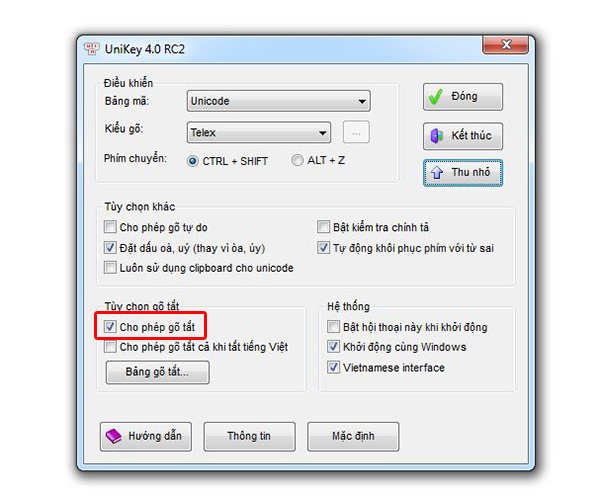
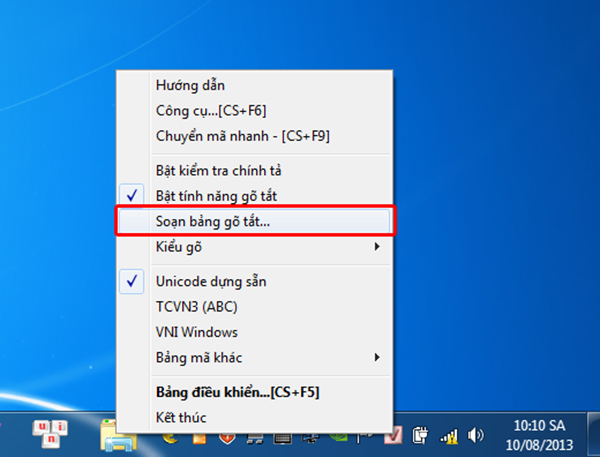
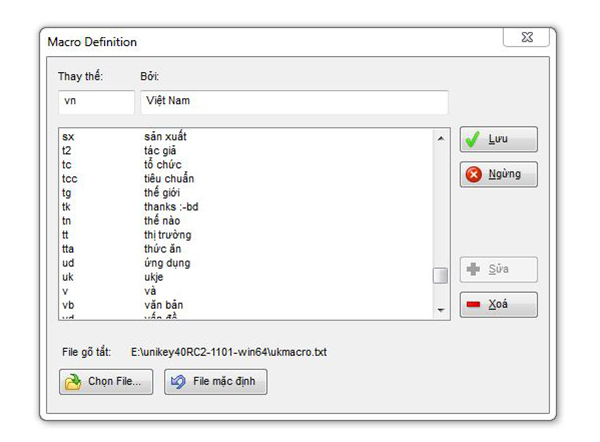
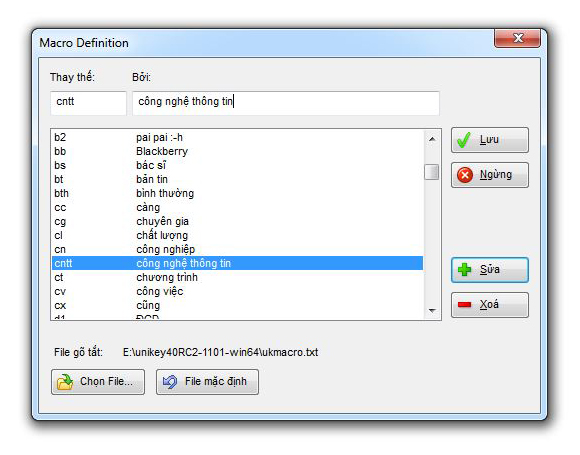
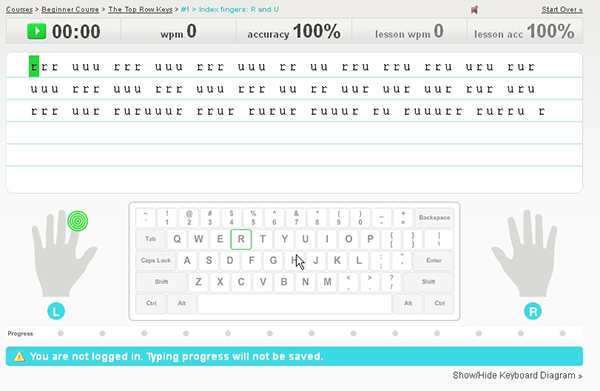
			<p id="aui_3_2_0_1372" style="margin: 0px 0px 1em; font-family: tahoma; color: rgb(0, 0, 0); padding: 3px 0px !important; font-size: 14px !important; text-align: justify; background-color: rgb(253, 253, 253);"> <strong style="font-stretch: normal; padding: 3px 0px !important;">Sử dụng tính năng gõ tắt của Unikey&nbsp;</strong></p><p id="aui_3_2_0_1377" style="margin: 0px 0px 1em; font-family: tahoma; color: rgb(0, 0, 0); padding: 3px 0px !important; font-size: 14px !important; text-align: justify; background-color: rgb(253, 253, 253);"> Unikey là một trong những chương trình gõ tiếng Việt Unicode phổ biến nhất tại Việt Nam đối với người dùng tiếng Việt Unicode. Phầm mềm miễn phí này cho phép gõ tiếng Việt Unicode trong các tài liệu Word, Excel và nhiều chương trình khác trên mọi hệ điều hành Windows. Tuy nhiên vẫn có khá nhiều người dùng máy tính văn phòng biết đến tính năng gõ tắt rất hữu ích của chương trình miễn phí này.</p><p id="aui_3_2_0_1380" style="margin: 0px 0px 1em; font-family: tahoma; color: rgb(0, 0, 0); padding: 3px 0px !important; font-size: 14px !important; text-align: justify; background-color: rgb(253, 253, 253);"> Đầu tiên bạn cần kích hoạt tính năng gõ tắt bằng cách mở chương trình Unikey, chọn thẻ&nbsp;<em>Mở rộng</em>. Sau đó đánh dấu&nbsp;<em>Cho phép gõ tắt</em>&nbsp;tại mục&nbsp;<em>Tuỳ chọn gõ tắt</em>. Chọn xong bạn ấn&nbsp;<em>Đóng&nbsp;</em>để chương trình lưu lại thay đổi.</p><p style="margin: 0px 0px 1em; font-family: tahoma; color: rgb(0, 0, 0); padding: 3px 0px !important; font-size: 14px !important; background-color: rgb(253, 253, 253);"> <img alt="" src="http://vnreview.vn/image/64/98/649834.jpg?t=1376109594983" style="border: 0px; width: 500px; height: 413px;" /></p><p id="aui_3_2_0_1383" style="margin: 0px 0px 1em; font-family: tahoma; color: rgb(0, 0, 0); padding: 3px 0px !important; font-size: 14px !important; text-align: justify; background-color: rgb(253, 253, 253);"> Tiếp đó, bạn bắt đầu gán từ gõ tắt bằng cách click chuột phải vào biểu tượng chữ V và chọn&nbsp;<em>Soạn bảng gõ tắt</em>.</p><p style="margin: 0px 0px 1em; font-family: tahoma; color: rgb(0, 0, 0); padding: 3px 0px !important; font-size: 14px !important; text-align: center; background-color: rgb(253, 253, 253);"> <img alt="" src="http://vnreview.vn/image/64/98/649838.jpg?t=1376109594983" style="border: 0px; width: 500px; height: 381px;" /></p><p id="aui_3_2_0_1386" style="margin: 0px 0px 1em; font-family: tahoma; color: rgb(0, 0, 0); padding: 3px 0px !important; font-size: 14px !important; text-align: justify; background-color: rgb(253, 253, 253);"> Trong hộp thoại&nbsp;<em>Macro Definition</em>, bạn nhập từ khoá cần gán vào ô&nbsp;<em>Thay thế</em>, từ gõ tắt vào ô&nbsp;<em>Bởi</em>. Thí dụ ở đây bạn muốn gõ tắt cụm từ &quot;Việt Nam&quot; bằng cách gõ &quot;vn&quot; thì bạn cần nhập từ &quot;vn&quot; vào ô&nbsp;<em>Thay thế,&nbsp;</em>và &quot;Việt Nam&quot; vào ô&nbsp;<em>Bởi</em>. Nhập xong bạn ấn&nbsp;<em>Lưu</em>&nbsp;để Unikey thực hiện gõ tắt. Một lưu ý là dãy gõ tắt chỉ chứa các chữ không dấu hoặc số. Dãy gõ tắt có phân biệt chữ hoa và chữ thường</p><p style="margin: 0px 0px 1em; font-family: tahoma; color: rgb(0, 0, 0); padding: 3px 0px !important; font-size: 14px !important; text-align: center; background-color: rgb(253, 253, 253);"> <img alt="" src="http://vnreview.vn/image/64/98/649842.jpg?t=1376109594983" style="border: 0px; width: 500px; height: 368px;" /></p><p id="aui_3_2_0_1389" style="margin: 0px 0px 1em; font-family: tahoma; color: rgb(0, 0, 0); padding: 3px 0px !important; font-size: 14px !important; text-align: justify; background-color: rgb(253, 253, 253);"> Cách sử dụng đơn giản như vậy nhưng để đạt đến tốc độ &quot;siêu tốc&quot; thì bạn cần ghi nhớ một lượng lớn những từ viết tắt. Tuy nhiên điều này cũng không phải quá khó thực hiện, bạn đọc chỉ cần lưu ý những điểm sau đây:</p><p id="aui_3_2_0_1392" style="margin: 0px 0px 1em; font-family: tahoma; color: rgb(0, 0, 0); padding: 3px 0px !important; font-size: 14px !important; text-align: justify; background-color: rgb(253, 253, 253);"> Lưu ý đầu tiên là nên gán phím tắt cho những từ thông dụng trong tiếng Việt như &quot;nhưng, những, nhiều…&quot; và các cụm từ thường sử dụng cho công việc như &quot;hôm nay, nội dung, hoạt động, phát triển, kế hoạch, sản xuất…&quot;</p><p style="margin: 0px 0px 1em; font-family: tahoma; color: rgb(0, 0, 0); padding: 3px 0px !important; font-size: 14px !important; text-align: justify; background-color: rgb(253, 253, 253);"> Thứ hai, bạn nên đặt những từ gõ tắt dưới 3 ký tự, và cần phải đặt những từ gõ tắt này giống với những ký tự mà &quot;ngày xưa&quot; khi tập chép bài giảng bạn thường hay áp dụng. Thí dụ gán &quot;hn&quot; cho &quot;Hà Nội&quot;, &quot;vn&quot; cho &quot;Việt Nam&quot;, &quot;cv&quot; cho &quot;công việc&quot;, &quot;pt&quot; cho &quot;phát triển&quot;, &quot;ns&quot; cho &quot;năng suất&quot;, &quot;nd&quot; cho &quot;nội dung&quot;…&nbsp;</p><p style="margin: 0px 0px 1em; font-family: tahoma; color: rgb(0, 0, 0); padding: 3px 0px !important; font-size: 14px !important; text-align: justify; background-color: rgb(253, 253, 253);"> Một chú ý nữa là nếu muốn tạm ngừng việc gõ tắt mà không phải thoát Unikey bạn gõ phím Pause/Break. Trường hợp bạn muốn gõ 1 dấu trắng sau cụm gõ tắt là &quot;vn&quot; mà không muốn &quot;vn&quot; bị đổi thành &quot;Việt Nam&quot; thì có thể giữ phím SHIFT trước khi gõ Space (phím dấu cách).</p><p style="margin: 0px 0px 1em; font-family: tahoma; color: rgb(0, 0, 0); padding: 3px 0px !important; font-size: 14px !important; text-align: justify; background-color: rgb(253, 253, 253);"> Để chỉnh sửa lại các từ gõ tắt bạn cũng mở mục&nbsp;<em>Soạn bảng gõ tắt</em>, chọn từ cần chỉnh sửa, tại ô thay thế nhập từ khoá mới, sau đó ấn&nbsp;<em>Sửa</em>, kết thúc bạn cũng chọn&nbsp;<em>Lưu</em>&nbsp;để đóng hộp thoại.</p><p style="margin: 0px 0px 1em; font-family: tahoma; color: rgb(0, 0, 0); padding: 3px 0px !important; font-size: 14px !important; text-align: center; background-color: rgb(253, 253, 253);"> <img alt="" src="http://vnreview.vn/image/64/98/649846.jpg?t=1376109594983" style="border: 0px; width: 500px; height: 392px;" /></p><p id="aui_3_2_0_1395" style="margin: 0px 0px 1em; font-family: tahoma; color: rgb(0, 0, 0); padding: 3px 0px !important; font-size: 14px !important; text-align: justify; background-color: rgb(253, 253, 253);"> Và để xoá một từ gõ tắt bạn cũng làm tương tự như khi tiến hành chỉnh sửa: chọn từ cần loại bỏ sau đó bấm<em>Xoá</em>, bấm&nbsp;<em>Lưu</em>&nbsp;để Unikey thực hiện lệnh.</p><p style="margin: 0px 0px 1em; font-family: tahoma; color: rgb(0, 0, 0); padding: 3px 0px !important; font-size: 14px !important; text-align: justify; background-color: rgb(253, 253, 253);"> <strong style="font-stretch: normal; padding: 3px 0px !important;">Vô hiệu hoá bàn di chuột trên laptop</strong></p><p id="aui_3_2_0_1398" style="margin: 0px 0px 1em; font-family: tahoma; color: rgb(0, 0, 0); padding: 3px 0px !important; font-size: 14px !important; text-align: justify; background-color: rgb(253, 253, 253);"> Bàn di chuột (touchpad) trên máy tính xách tay nhiều lúc khiến người dùng cảm thấy phiền toái vì chỉ cần hơi chạm nhẹ là con trỏ bị dịch chuyển khiến cho các ký tự được gõ bị thay đổi vị trí xuất hiện, việc soạn thảo văn bản sẽ kéo dài với các thao tác sửa chữa những từ đã gõ sai.</p><p style="margin: 0px 0px 1em; font-family: tahoma; color: rgb(0, 0, 0); padding: 3px 0px !important; font-size: 14px !important; text-align: center; background-color: rgb(253, 253, 253);"> <img alt="" src="http://vnreview.vn/image/64/98/649850.jpg?t=1376109594983" style="border: 0px; width: 500px; height: 424px;" /></p><p style="margin: 0px 0px 1em; font-family: tahoma; color: rgb(0, 0, 0); padding: 3px 0px !important; font-size: 14px !important; text-align: justify; background-color: rgb(253, 253, 253);"> Một số laptop có nút chuyển (hoặc dùng phím chức năng) bật/tắt cho touchpad, bằng cách ấn đồng thời 2 phím Fn và F7. Người dùng nên đọc kỹ hướng dẫn sử dụng để tìm phím tắt dành riêng cho từng loại laptop.</p><p style="margin: 0px 0px 1em; font-family: tahoma; color: rgb(0, 0, 0); padding: 3px 0px !important; font-size: 14px !important; text-align: justify; background-color: rgb(253, 253, 253);"> Ngoài ra để vô hiệu hoá bàn di chuột bạn đọc có thể sử dụng phần mềm chuyên dụng Touchpad Blocker. Đây là công cụ mạnh mẽ khi mang trong mình cơ chế linh động tự động để cho phép và vô hiệu hóa Toudpad. Đặc biệt công cụ được cung cấp hoàn toàn miễn phí đến người dùng. Tải chương trình tại&nbsp;<a href="http://touchpad-blocker.com/files/touchpad-blocker.exe" style="outline: none; text-decoration: none; color: rgb(0, 58, 199);">đây</a>.</p><p style="margin: 0px 0px 1em; font-family: tahoma; color: rgb(0, 0, 0); padding: 3px 0px !important; font-size: 14px !important; text-align: center; background-color: rgb(253, 253, 253);"> <img alt="" src="http://vnreview.vn/image/64/98/649862.jpg?t=1376109594983" style="border: 0px; width: 488px; height: 499px;" /></p><p style="margin: 0px 0px 1em; font-family: tahoma; color: rgb(0, 0, 0); padding: 3px 0px !important; font-size: 14px !important; text-align: justify; background-color: rgb(253, 253, 253);"> Sau khi cài đặt và khởi động, giao diện Touchpad Blocker hiện ra khá đơn giản. Trên đó có 4 tùy chọn được đánh dấu sẵn là Automatically run program on startup (tự động kích hoạt chương trình Touchpad Blocker khi khởi động Windows), Block accidental taps and clicks (khóa Toudpad khi phát hiện tốc độ gõ bàn phím liên tục nhanh trong khoảng thời gian nào đó, tính bằng miliseconds&nbsp;- mili giây. Mặc định là 300 miliseconds). Thiết lập xong, bạn nhấn nút X (Close) để đóng cửa sổ chương trình lại.</p><p style="margin: 0px 0px 1em; font-family: tahoma; color: rgb(0, 0, 0); padding: 3px 0px !important; font-size: 14px !important; text-align: justify; background-color: rgb(253, 253, 253);"> <strong style="font-stretch: normal; padding: 3px 0px !important;">Luôn giữ cho bàn phím sạch sẽ</strong></p><p style="margin: 0px 0px 1em; font-family: tahoma; color: rgb(0, 0, 0); padding: 3px 0px !important; font-size: 14px !important; text-align: justify; background-color: rgb(253, 253, 253);"> Bàn phím là nơi tiếp xúc hàng ngày và rất dễ bị bám bẩn do môi trường hoặc thói quen ăn uống của người sử dụng. Các chất bẩm bám vào bề mặt phím hoặc lọt vào khe giữa các phím, gây giắt bàn phím hoặc thậm chí gây hỏng thiết bị. Bàn phím máy tính cũng thường chịu nhiều bụi bẩn và dấu vân tay do đây là một trong những thiết bị được người dùng văn phòng chạm vào nhiều nhất trong cuộc sống hàng ngày. Đây cũng chính là một trong những nguyên nhân chính dẫn đến việc giảm tốc độ gõ hay thậm chí là thiết bị nhận nhầm ký tự.</p><p style="margin: 0px 0px 1em; font-family: tahoma; color: rgb(0, 0, 0); padding: 3px 0px !important; font-size: 14px !important; text-align: center; background-color: rgb(253, 253, 253);"> <img alt="" src="http://vnreview.vn/image/64/98/649858.jpg?t=1376109594983" style="border: 0px; width: 500px; height: 334px;" /></p><p style="margin: 0px 0px 1em; font-family: tahoma; color: rgb(0, 0, 0); padding: 3px 0px !important; font-size: 14px !important; text-align: center; background-color: rgb(253, 253, 253);"> <em>Việc làm sạch bàn phím thường xuyên sẽ giúp nâng cao hiệu quả sử dụng.</em></p><p style="margin: 0px 0px 1em; font-family: tahoma; color: rgb(0, 0, 0); padding: 3px 0px !important; font-size: 14px !important; text-align: justify; background-color: rgb(253, 253, 253);"> Để làm sạch bàn phím máy tính thì cách làm đơn giản và nhanh nhất là lật ngược thiết bị và lắc mạnh cho bụi rơi ra. Bạn cũng có thể dùng chổi (thường đi kèm bộ vệ sinh laptop) quét sạch ở kẽ bàn phím, sau đó lấy tăm bông hoặc bông gòn, vải mềm thấm cồn 90 rồi lau lên bề mặt bàn phím cũng như giữa các khe kẽ, cồn là chất làm sạch rất hiệu quả. Với những khe nhỏ có bụi lọt vào không quét được bằng chổi, bạn có thể dùng tăm nhỏ để gẩy những đám bụi cứng đầu đó lên trước khi lau bằng khăn hoặc giấy thấm cồn.</p><p style="margin: 0px 0px 1em; font-family: tahoma; color: rgb(0, 0, 0); padding: 3px 0px !important; font-size: 14px !important; text-align: justify; background-color: rgb(253, 253, 253);"> <strong style="font-stretch: normal; padding: 3px 0px !important;">Tự luyện tập gõ văn bản trực tuyến</strong></p><p style="margin: 0px 0px 1em; font-family: tahoma; color: rgb(0, 0, 0); padding: 3px 0px !important; font-size: 14px !important; text-align: justify; background-color: rgb(253, 253, 253);"> Hiện có khá nhiều trang web giúp người sử dụng máy tính có thể tự luyện tập và thuần thục kỹ năng gõ &quot;10 ngón&quot;, một trong số đó là&nbsp;<a href="http://www.typingweb.com/" style="outline: none; text-decoration: none; color: rgb(0, 58, 199);">http://www.typingweb.com/</a>. Đây là một website dạy đánh máy miễn phí với giao diện đẹp và chuyên nghiệp. Website sẽ luyện tập cho người học 5 yếu tố quan trọng nhất trong kỹ thuật gõ văn bản bao gồm khả năng nhớ bàn phím, sự chú ý, tốc độ đánh máy, khả năng linh hoạt khi xử lý văn bản và kỹ năng sửa chữa lỗi khi gõ sai.</p><p style="margin: 0px 0px 1em; font-family: tahoma; color: rgb(0, 0, 0); padding: 3px 0px !important; font-size: 14px !important; text-align: center; background-color: rgb(253, 253, 253);"> <em><img alt="" src="http://vnreview.vn/image/64/98/649866.jpg?t=1376109918689" style="border: 0px; width: 500px; height: 326px;" /></em></p><p style="margin: 0px 0px 1em; font-family: tahoma; color: rgb(0, 0, 0); padding: 3px 0px !important; font-size: 14px !important; text-align: center; background-color: rgb(253, 253, 253);"> <em>Typingweb giúp người sử dụng tự luyện tập và đánh giá khả năng đánh máy của mình.</em></p><p id="aui_3_2_0_1401" style="margin: 0px 0px 1em; font-family: tahoma; color: rgb(0, 0, 0); padding: 3px 0px !important; font-size: 14px !important; text-align: justify; background-color: rgb(253, 253, 253);"> Qua mỗi bài học, các thống kê sẽ hiển thị ở phía trên website. Do đó người sử dụng sẽ biết rõ mình đã đánh máy trong thời gian bao lâu với tốc độ và độ chính xác như thế nào. Website còn vẽ cho bạn những biểu đồ và đồ thị để bạn đánh giá được kỹ năng của mình một cách trực quan nhất.</p><p id="aui_3_2_0_1404" style="margin: 0px 0px 1em; font-family: tahoma; color: rgb(0, 0, 0); padding: 3px 0px !important; font-size: 14px !important; text-align: justify; background-color: rgb(253, 253, 253);"> Tuy vậy bạn cần đăng kí tài khoản miễn phí tại trang web để không giới hạn về các bài học, bài luyện. Trong quá trình gõ, bạn chú ý đến hình hai bàn tay hai bên bàn phím để theo dõi cách đặt ngón cũng như gõ sao cho đúng. Những phím có màu hồng là phím bạn gõ hay bị sai.</p>
		</div>
	</div>
	<div id="footer" class="clearfix">
		<div id="url">
			<strong>URL của bản tin này: </strong><a href="https://dienbien.edu.vn/index.php/savefile/tin-tuc-tong-hop/CNTT-NCKH-4-meo-giup-go-tieng-Viet-toc-do-nhanh-1733.html" title="CNTT&amp;NCKH - 4 mẹo giúp gõ tiếng Việt tốc độ nhanh">https://dienbien.edu.vn/index.php/savefile/tin-tuc-tong-hop/CNTT-NCKH-4-meo-giup-go-tieng-Viet-toc-do-nhanh-1733.html</a>

		</div>
		<div class="clear"></div>
		<div class="copyright">
			&copy; Sở Giáo dục và Đào tạo Điện Biên
		</div>
		<div id="contact">
			<a href="mailto:webmaster@example.com">webmaster@example.com</a>
		</div>
	</div>
</div>
        <div id="timeoutsess" class="chromeframe">
            Bạn đã không sử dụng Site, <a onclick="timeoutsesscancel();" href="https://dienbien.edu.vn/#">Bấm vào đây để duy trì trạng thái đăng nhập</a>. Thời gian chờ: <span id="secField"> 60 </span> giây
        </div>
        <div id="openidResult" class="nv-alert" style="display:none"></div>
        <div id="openidBt" data-result="" data-redirect=""></div>
<div id="run_cronjobs" style="visibility:hidden;display:none;"><img alt="cron" src="/index.php?second=cronjobs&amp;p=v0ek8d86" width="1" height="1" /></div>
<script src="https://dienbien.edu.vn/assets/js/jquery/jquery.min.js"></script>
<script>var nv_base_siteurl="/",nv_lang_data="vi",nv_lang_interface="vi",nv_name_variable="nv",nv_fc_variable="op",nv_lang_variable="language",nv_module_name="news",nv_func_name="savefile",nv_is_user=0, nv_my_ofs=-4,nv_my_abbr="EDT",nv_cookie_prefix="vidoco",nv_check_pass_mstime=1738000,nv_area_admin=0,nv_safemode=0,theme_responsive=0,nv_recaptcha_ver=2,nv_recaptcha_sitekey="",nv_recaptcha_type="image",XSSsanitize=1;</script>
<script src="https://dienbien.edu.vn/assets/js/language/vi.js"></script>
<script src="https://dienbien.edu.vn/assets/js/DOMPurify/purify3.js"></script>
<script src="https://dienbien.edu.vn/assets/js/global.js"></script>
<script src="https://dienbien.edu.vn/assets/js/site.js"></script>
<script src="https://dienbien.edu.vn/themes/edu-sgd/js/news.js"></script>
<script src="https://dienbien.edu.vn/themes/edu-sgd/js/main.js"></script>
<script src="https://dienbien.edu.vn/themes/edu-sgd/js/custom.js"></script>
<script type="application/ld+json">
        {
            "@context": "https://schema.org",
            "@type": "Organization",
            "url": "https://dienbien.edu.vn",
            "logo": "https://dienbien.edu.vn/uploads/logo-so-gddt.png"
        }
        </script>
<script src="https://dienbien.edu.vn/themes/edu-sgd/js/bootstrap.min.js"></script>
</body>
</html>